FairPlay App — Official Build, Four Screens From APK Tap to a Live Lobby
On Android, the FairPlay app comes as an APK: grab it, let Chrome install it, open the icon and sign in with your mobile number or User ID, and the balance you already have is waiting. On iPhone there is no APK, just a Safari shortcut that opens the same FairPlay sign-in card.
- Android APK, no store listing
- 2 login modes: mobile or User ID
- iPhone: Safari shortcut
- 24x7 WhatsApp desk


Sign in to the FairPlay app
or continue with WhatsApp
Get ID on WhatsAppDon't have an account? Register a FairPlay ID
Four screens, start to finish
FairPlay App Install in 4 Screens — Quick Visual Walkthrough
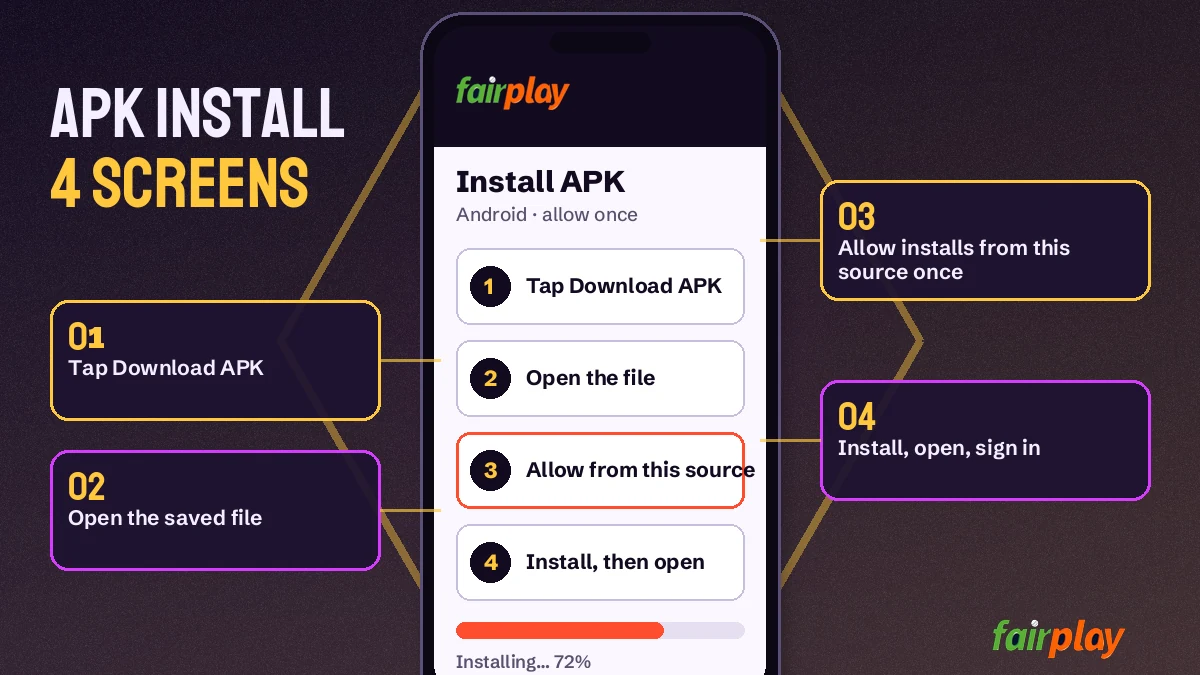
Four screens on Android, and the fourth one is simply the sign-in card you would see in a browser. Get the FairPlay APK, give your browser permission to install it, launch the icon it creates, then enter the mobile number or User ID you already use. Same ID. Same balance.
- 01
FairPlay APK Download — Tap the Official Link
Use the Download FairPlay APK button in the sign-in card above. It opens the FairPlay address, and the APK file lands in your phone's Downloads folder. One file, nothing else to fetch.
- 02
Allow FairPlay Install — One Quick Permission
Android asks whether Chrome (or whichever browser you used) may install apps. Switch that on for the browser, go back, and tap Install.
- 03
Open the FairPlay App — Fresh Icon Ready
Your app drawer now holds a FairPlay icon. First launch lands on the sign-in card, the same two tabs you see at the top of this page.
- 04
FairPlay App Sign-In — Your Existing ID Works
Pick Mobile Number or User ID, type the password, tap Login. No new account. If you have none yet, the Register link sits right under the card.
That is the whole install. Most of the confusion people run into sits in in screen two, because Android words the permission prompt differently on each phone brand, and a few phones bury it under Settings instead of showing a pop-up.
FairPlay APK Download Steps — Detailed Android Install
Same four screens, a bit more slowly, with what to tap when a phone behaves oddly.
- Start the FairPlay APK downloadTap Download FairPlay APK on this page and let the FairPlay address load; the APK saves to the Downloads folder.
- Open the downloaded fileTap the finished download; if that notice has already vanished, Files keeps the FairPlay APK under Downloads, normally near the top as the newest item.
- Allow installs from your browserAndroid halts and names the browser that fetched the file; follow the Settings link, flip the switch for that one browser, and return with back.
- Install and open FairPlayBack on the file screen, press Install; a few seconds later Android offers Open, or the new FairPlay icon shows up among your apps.
- Sign in with your FairPlay IDChoose Mobile Number or User ID, type your password and tap Login; use the Register link if you have no ID yet.
Step three is where Android shows a scary-sounding line about unknown apps. Android words it that way for every file that does not come from a store, and that includes the FairPlay APK, since FairPlay has no Play Store listing to install from. You can switch the permision off again afterwards (plenty of people do), and the installed FairPlay app keeps working.
Taps, roughly, between the FairPlay APK download finishing and the sign-in card appearing: open file, Settings, allow, back, Install. Some phones add one more.
One practical point. If the download itself stalls, the address may be blocked on your network, which happens to betting domains in India every so often. FairPlay keeps fresh working addresses, and the WhatsApp desk sends the current one, so tap the WhatsApp button and ask for it.
Pick your route
FairPlay App or Browser — Which Access Is Best for You?
Both open the same FairPlay account, so the choice is about habit rather than features. The FairPlay application sits on your home screen and opens straight to the sign-in card. Going through a browser needs no install at all and works on iPhone, Android and a laptop alike, which is why many FairPlay users keep both.
| Point | FairPlay app (Android APK) | FairPlay in a browser |
|---|---|---|
| How you get it | Download the APK, allow the install once | Open the FairPlay address, nothing to install |
| Phones | Android only | Android, iPhone, tablet, laptop |
| Sign-in | Mobile Number or User ID tab, password | Same card, same two tabs |
| Balance | One wallet shared with every device | Same wallet, same balance |
| Blocked address | Updated address from the WhatsApp desk | Open the new address the desk sends |
| Updates | Install the latest APK over the old one | Nothing to do; the page is always current |
Honestly, the gap is smaller then people expect. You get an icon and a slightly shorter trip to the login card with the FairPlay app; with the browser you skip the permission prompt and updates. Deposits by UPI, withdrawals, the demo balance and the 24x7 WhatsApp desk sit in the same place either way.
If you are only trying FairPlay out, the browser plus Demo Login is probably the lighter start.
A mixed setup is common, and it works because nothing is stored on the handset. Someone might keep the FairPlay app on an Android phone for evenings, then open FairPlay on an office laptop during a Test match session and find the same open bets, the same balance and the same wallet history. Log out on one, log in on the other. That is all there is to it, with no sync button and no export.
FairPlay App Names People Type — Trusted Plain Meanings
Every route to the fairplay app ends at one installer and one sign-in card. Whether you typed fairplay app download, fairplay apk or fairplay application, the file is the same, and after the install it shows the fairplay login card with both tabs. On a laptop the equivalent is fairplay online or fairplay live in a browser, and plain fairplay searches land there too.
FairPlay Login and ID Searches
Type fairplay log in or my fairplay login and you reach the card the APK opens on, with a Mobile Number tab and a User ID tab. Pick the tab you registered with. The fairplay login password is the one you set on the Register form, and a fairplay password reset only works with that SIM in the phone, because the code comes by SMS.
- No account yet: fairplay sign up, searched as fairplay registration or fairplay 24 registration too, ends with a fairplay id.
- A fairplay new id or fairplay cricket id also comes ready-made from the desk, reached through the fairplay whatsapp number, also listed as the fairplay customer care number.
- Practice first with fairplay demo login and its no-deposit balance.
FairPlay Addresses and Games in One Account
Names like fairplay pro, fairplay pro com, my fairplay, fairplay global, fairplay club, fairplay 1 club, fairplay 24, fairplay login 24, fairplay in 24, fairplay 24 win, fairplay 111, fairplay gold and fairplay red are addresses; when one gets blocked, the ID and balance open on the next. Behind every address sits the fairplay betting app lobby people call fairplay bet: fairplay cricket, fairplay games, the fairplay casino and fairplay aviator.
One ID, every lobby
FairPlay Application Games — Live Cricket, Casino and Aviator Inside
Everything the FairPlay website carries is inside the FairPlay app: the sports exchange for cricket, football, tennis and kabaddi, plus the live casino with Teen Patti, Andar Bahar, Dragon Tiger, roulette, baccarat and Aviator. Everything runs on one FairPlay balance, so there is no transfer between a sports wallet and a casino wallet.
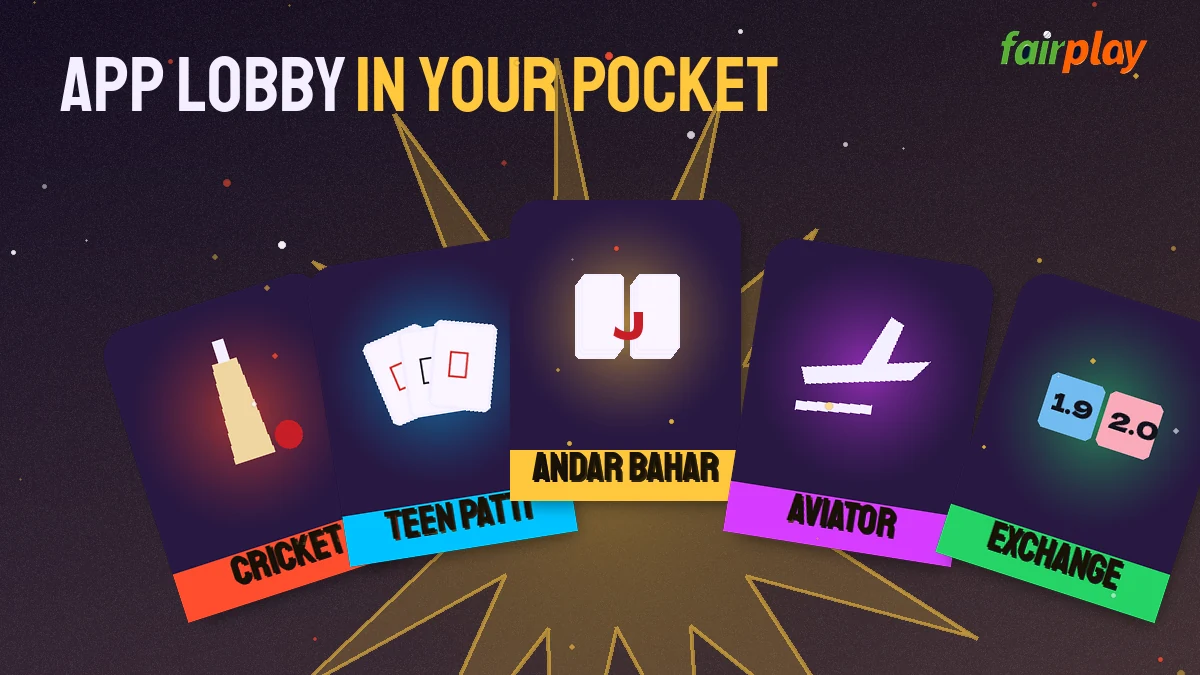
Say an IPL game is on. Inside the FairPlay app it sits on the exchange with back and lay on the result, while fancy and session lines run beside it for as long as the innings lasts; Tests, internationals and domestic T20 fixtures work the same way, and football, tennis and kabaddi share that sports list.
- Sports exchange: back and lay on cricket, football, tennis, kabaddi
- Cricket extras: fancy and session markets during play
- Live casino: Teen Patti, Andar Bahar, Dragon Tiger, roulette, baccarat
- Crash games: Aviator and similar titles
- Wallet: UPI deposit and withdrawal from the same app screen
UPI deposits and withdrawals happen in the wallet section, in the app exactly as on the site. If you set a separate withdrawal password on your FairPlay ID, the app asks for it there too. For a full rundown of the tables, see the FairPlay games page, which lists each lobby in more detail than fits here.
Switching sides mid-match is quick. The FairPlay app keeps the sports list and the casino lobby one tap apart, so an IPL innings break can go to a Dragon Tiger table and back without signing in again; the balance moves with you because there is only one.
Demo Login works in the app as well. You get a practice balance with no deposit, and nothing won on it can be withdrawn, which makes it a fair way to see how the exchange screen and a Teen Patti table behave on your own phone before any money goes in.
Apple phones
FairPlay App for iPhone — Quick Home-Screen Shortcut Route
iPhone owners use FairPlay through Safari. Sign-in, the wallet, the cricket exchange and every casino lobby behave the same there; what is missing is only the installer, since the FairPlay APK is an Android package and Apple phones refuse that file type. A shortcut on the home screen fills the icon gap in under a minute.
On iPhone, skip any file claiming to be a FairPlay iOS app. Open the FairPlay address in Safari, tap the Share icon, choose Add to Home Screen, name it FairPlay and tap Add. From then on that icon opens straight to the sign-in card.
Inside that shortcut everything is the same: Mobile Number or User ID tab, password with the eye icon to check what you typed, Forgot Password, Demo Login and the WhatsApp route. Your FairPlay balance and bets match what you see on an Android phone or a laptop, because they live on the account and not on the device.
One catch. If the FairPlay address gets blocked, the shortcut still points at the old one. Delete it and add a fresh shortcut from the new address the WhatsApp desk sends you.
Keeping it current
FairPlay App Update — Install the Latest APK Safely Over the Old One
Updating FairPlay on Android means repeating the download. Fetch the newest APK with the same Download FairPlay APK button, then tap Install when Android offers to replace what is already there. No fresh registration follows, and the wallet sits exactly where you left it, because the phone never held your FairPlay ID or balance in the first place.
You do not need to uninstall first. In fact it is easier not to.
When should you bother? Usually the trigger is the FairPlay app refusing to load, or a message from the desk saying a newer file is ready. A blocked address is the common cause, and the new address from the WhatsApp desk sorts it. Sometimes the fix is simpler still: clearing the app from recent apps and opening it again.
FairPlay ID for every route. App, browser, iPhone shortcut, a new address after a block: the same login and the same balance open on all of them.
If Android says the package conflicts with an existing app, that usually means the old copy came from somewhere other than the FairPlay link. Uninstall it, then install the new file. Nothing on your account is lost, though you will type your password once more on the first launch.
After any FairPlay app update, it is sensible to open the wallet section once and check the balance matches what you last saw. It will (the account sits on the server, not in the APK), but a quick look settles the question before a match starts.
When it will not open
FairPlay App Login Problems — Fast Fixes for Password, Install and Address
Most FairPlay app login problems come down to three things: a wrong password, an install Android blocked halfway, or an address that stopped loading. Each has a short fix, and the 24x7 WhatsApp desk can sort any of them if the fix below does not work.
| What you see | Likely cause | What to do |
|---|---|---|
| Wrong password message | Typo or old password | Tap the eye icon to check it; still wrong, use Forgot Password |
| Install blocked | Browser not allowed to install apps | Settings on the prompt, allow the browser, tap Install again |
| App open, page blank | Address blocked on your network | Ask the WhatsApp desk for the current address |
| Mobile number not accepted | Extra digits or missing +91 | Type the 10-digit number only; the +91 is already set |
| OTP not arriving | Mobile number mistyped, or a slow SMS | Check the 10 digits, wait a moment, request it again, or ask the desk |
| No account found | Never registered | Use Register or get a ready ID on WhatsApp |
The reset link sits right under the Login button, labelled Forgot FairPlay password?, and in practice it depends on one thing: the SIM that registered the account being in your phone. Keep it in, type the code, choose a new password. Done in a minute or two. A withdrawal password set inside FairPlay goes through that same link. More on the sign-in card itself is on the FairPlay login page.
Changed your SIM since registering? The SMS then goes to a number you no longer hold, and waiting will not bring it. Message the WhatsApp desk instead; it resets the FairPlay login password over chat, plus the withdrawal password if you need that too.
A typical case: an Android user installs the FairPlay app, then gets "no account found" after typing a User ID from memory. That ID was registered by mobile number. Switching to the Mobile Number tab fixes it on the spot.
Installed the FairPlay app before making an account? Nothing is lost. The Register link under its sign-in card takes a mobile number, the Get OTP code, a password, plus an optional User ID and referral code, and the new FairPlay ID works in the app straight away. Hate forms? The WhatsApp desk sends a ready ID and password over chat instead; the FairPlay ID page compares them.
Before the first UPI deposit from the FairPlay app: accounts are 18+, and whether online betting is allowed depends on which Indian state you are in. That check is yours to make.
FairPlay App Questions — Verified Answers on APK, iPhone and Login
What is the FairPlay app?
The FairPlay app is the Android version of FairPlay, installed from an APK file. It opens the same account as the website, with the cricket exchange, football, tennis, kabaddi, the live casino and Aviator on one balance, plus UPI deposits and withdrawals in the wallet section.
How do I download the FairPlay app?
Five taps, roughly. Press Download FairPlay APK in the sign-in card, open the finished file, let your browser install apps when Android objects, press Install, then Open. The first screen is the FairPlay sign-in card with the Mobile Number and User ID tabs, where your existing password works.
Is the FairPlay app safe?
It depends on where the file came from. The FairPlay APK from the Download FairPlay APK button or the current FairPlay address is the genuine one, while copies passed around in groups cannot be checked. Android shows an unknown-app warning for anything outside a store. Accounts are 18+, and betting laws vary by state.
Is there a FairPlay app for iPhone?
No installable one. Apple phones cannot run an APK file, so iPhone users sign in to FairPlay through Safari instead, using the Mobile Number or User ID tab. The sports exchange, live casino, Aviator and the UPI wallet all load there. A Home Screen shortcut saves typing the FairPlay address every time.
How do I update the FairPlay app?
Download the latest FairPlay APK from the official link and install it over the old one; there is no need to uninstall first. Your ID and balance stay on the account. If the app stops loading after an address block, the WhatsApp desk sends the current working address.
How do I use the FairPlay app?
Open the FairPlay app, sign in with your mobile number or User ID and password, then pick a lobby: the sports exchange for cricket, football, tennis and kabaddi, or the live casino and Aviator. UPI deposits and withdrawals sit in the wallet section, and Demo Login gives a practice balance first.
Does my current FairPlay ID work inside the FairPlay app?
Yes, and there is nothing to transfer. After the APK install, the FairPlay sign-in card opens; choose the Mobile Number tab if you registered by phone, or User ID if you picked one, and type the password you already use. A no account found message usually means the wrong tab, not a missing account.
FairPlay App Download Searches — Best Related Queries
People looking for the FairPlay app also search
- fairplay app download
- fairplay apk download
- fairplay 24 app download apk
- fairplay application
- fairplay app kaise download kare
- fairplay apk install kaise kare
- fairplay app iphone me kaise chalaye
- fairplay app login nahi ho raha
- fairplay id kaise banaye